CKP Sensor Removal and Installation
CKP Sensor Removal and Installation
Removal
1. Vehicle Lift
1. Raise the vehicle on a lift, and make sure it is securely supported.
2. CKP Sensor
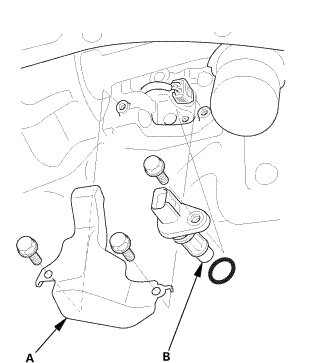
1. Remove the CKP sensor cover (A).
2. Disconnect the connector.
3. Remove the CKP sensor (B).
Installation
1. CKP Sensor
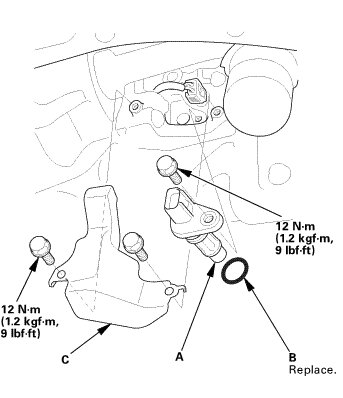
1. Install the CKP sensor (A) with a new O-ring (B).
2. Connect the connector.
3. Install the CKP sensor cover (C).
2. CKP Pattern Clear/CKP Pattern Learn
1. Select CRANK PATTERN in the ADJUSTMENT MENU with the HDS.
2. Select CRANK PATTERN CLEAR, and clear the CKP pattern.
3. Select CRANK PATTERN LEARNING with the HDS, and follow the screen prompts.