Clutch Pedal Position Switch Replacement
- Remove the driver's dashboard undercover (see
DRIVER'S DASHBOARD UNDERCOVER REMOVAL/INSTALLATION
).
- Disconnect clutch pedal position switch A, clutch pedal position switch B, and clutch pedal position switch C connectors (D).
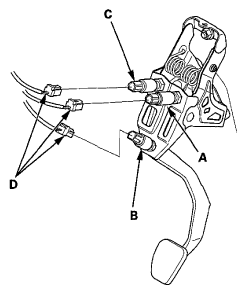 Courtesy of AMERICAN HONDA MOTOR CO., INC.
- Loosen the locknuts (D), then remove clutch pedal position switch A, clutch pedal position switch B, and clutch pedal position switch C from the clutch pedal assembly (E).
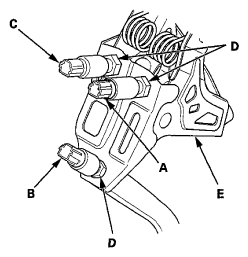 Courtesy of AMERICAN HONDA MOTOR CO., INC.
- Loosely install clutch pedal position switch A, clutch pedal position switch B, and clutch pedal position switch C to the clutch pedal assembly in the reverse order of removal.
NOTE:
- Do not let the clutch pedal position switch contact the clutch pedal.
- Make sure the installation position of each clutch position switch is correct.
- Connect clutch pedal position switch A, clutch pedal position switch B, and clutch pedal position switch C connectors.
- Adjust the clutch pedal, clutch pedal position switch A, clutch pedal position switch B, and clutch pedal position switch C (see CLUTCH PEDAL AND CLUTCH PEDAL POSITION SWITCH ADJUSTMENT
).
- Check the clutch operation.
- Install the driver's dashboard undercover (see
DRIVER'S DASHBOARD UNDERCOVER REMOVAL/INSTALLATION
).